 ProductReveal
About this product
Retouchia is a free online AI image editor that runs entirely in the browser. The product is for people who need to retouch a photo without installing desktop software. The public site is https://retouchia.com/. The maker one-line description is Free online AI image editor, retouch photos in seconds. The maker listed for this submission is Wu Si. The contact email is wsir78933@gmail.com. The public X profile given with the product is https://x.com/sirw333017.
What the tool does is a small set of photo jobs that come up in everyday editing. You can remove a background, erase an unwanted object, upscale a photo to 4K, restore a damaged image, and colorize an old photo. Those five jobs are the core of the product as described by the maker. They are not presented as a full desktop suite with layers, masks, and a plugin marketplace. They are browser tasks you start from a photo and finish in the same tab.
The free tier is part of the listing. The maker states that core editing is available without a watermark and without a credit card. When the free credits run out, credit packs are available. The product kit describes pricing as free to try with credits, and packs from $9.99. This submission treats Retouchia as freemium because a no-card free tier exists and paid credit packs exist after that. There is no claim here of an unlimited free plan, and there is no claim of a monthly subscription price beyond that pack starting point.
Because the editor runs in the browser, the install step disappears. That matters for people who cannot add software to a work computer, who share a machine, or who only need one edit and do not want a large application sitting on disk. Opening the site is the start of the workflow. There is no separate desktop client described in the materials used for this review.
Background removal is the first job. A product photo, a portrait, or a screenshot often needs the subject separated from the scene behind it. Retouchia lists background removal as a core edit. The expected result is a subject you can place on a plain field or reuse in a layout. This review does not claim a measured accuracy score, because no public benchmark was provided with the submission materials.
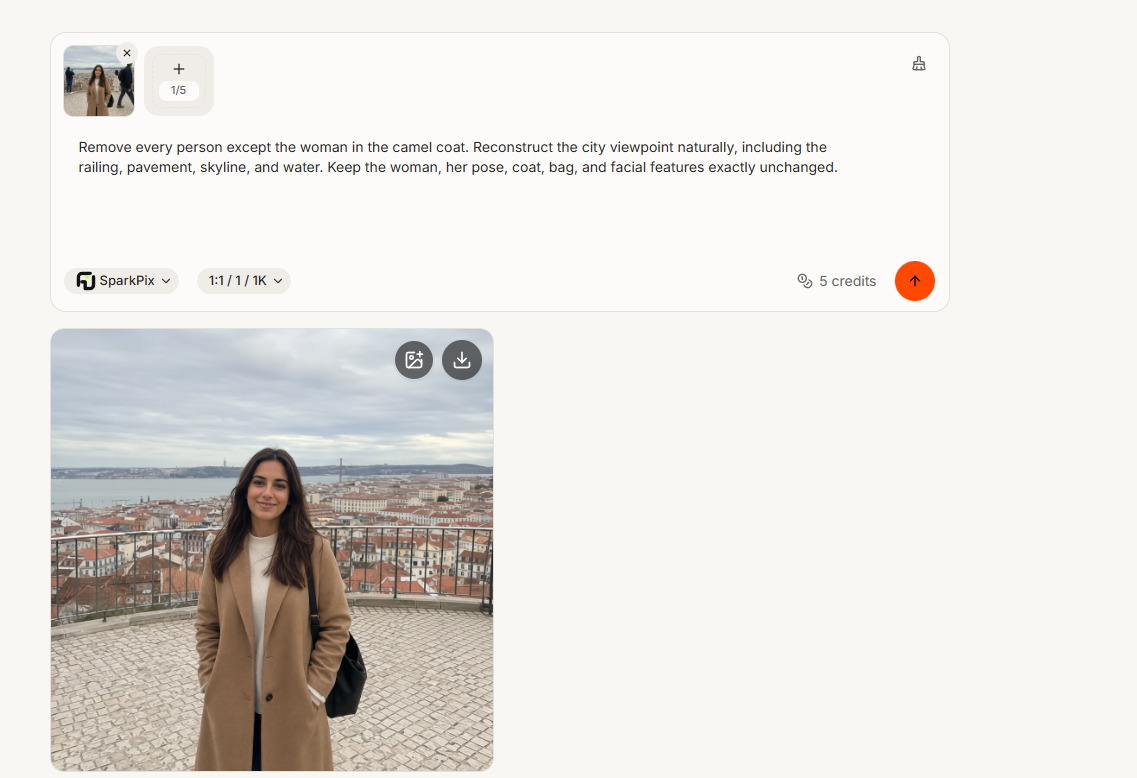
Object erase is the second job. A photo can be fine except for one distraction: a cable, a sign, a passerby, or a piece of clutter at the edge of the frame. The maker lists erasing unwanted objects as a core edit. The point of the feature is to take that object out and leave the rest of the picture. This write-up does not invent before-and-after scores.
Upscaling to 4K is the third job. Small exports, old phone photos, and cropped regions often look soft when they are placed in a larger layout. Retouchia lists upscale to 4K as a core edit. The useful case is making a picture large enough for a slide, a print, or a web hero without a separate upscaler. The listing does not claim that every source can become a sharp 4K file. It only says that 4K upscale is one of the tools offered.
Restore is the fourth job. Damaged images include scratches, folds, fading, and files that have been compressed too many times. The maker lists restore damaged images as a core edit. The expected use is an old family photo or a scan that is still recognizable but worn. This review does not claim a restoration of detail that was never in the file.
Colorize is the fifth job. Black and white photos and faded scans can be colorized so they are easier to view next to modern pictures. Retouchia lists colorize old photos as a core edit. Colorization is an interpretation, not a recovery of the original colors, and this listing should be read that way.
Retention details that are part of the product kit, and that should be checked on the live site before relying on them, are these. Uploads auto-delete after 1 hour, and results after 7 days. The short description also calls the product privacy-first. Those statements come from the maker submission kit, not from an independent audit. A reader who needs a retention guarantee should confirm the current policy on the website before uploading sensitive pictures.
Who it is for follows from the feature list. A seller who needs a clean product cutout, a student who needs a slide image, a family member who has a scanned print, and a writer who needs one object removed can all use the same browser editor. It is a weaker fit for someone who needs non-destructive layers, print-shop color prep, a team asset library, or a local-only pipeline that never uploads a file. Those needs are outside what the maker describes.
How the free and paid sides fit together is simple. Start on the free tier. Core editing is available, the maker says there is no watermark, and no credit card is required to begin. Credits are the limit. When free credits run out, credit packs take over, with packs described as starting from $9.99. There is no requirement in this ProductReveal submission to add a badge, a backlink, or a paid promotion. The listing requested here is the free review queue only.
The contact path is email, not a phone number. The address given for this submission is wsir78933@gmail.com. The maker name is Wu Si. The public social link provided is https://x.com/sirw333017. No LinkedIn URL, YouTube demo, or coupon code was provided, so those extras are left blank on purpose.
A fair short verdict is that Retouchia is a browser AI photo editor with five concrete jobs: background removal, object erase, 4K upscale, restore, and colorize. It is free to start, without a watermark and without a card, and it becomes a credit-pack product after free credits are used. It does not ask you to install a desktop app. That is the whole product as submitted, and it is the whole claim this review is willing to make.
The category list on the public submit form, at the time of this submission, only offered Developer Tools, Ad Blockers, and Development. None of those names is a photo category. Development was selected because it is the least specific of the three, not because Retouchia is a programming tool. Editors should recategorize the listing if a design, photo, or AI category is added later.
No account was created for this submission. The form states that the listing is free and that no account is required. Nothing was paid. No badge was added to the product site. The featured image is a product screenshot, and the optional logo is the product logo supplied with the submission kit. Gallery images were left empty.
Readers should treat this text as a structured product note written for a directory review field, not as a lab test. It repeats the maker feature list, the free-tier terms, the credit-pack starting price from the product kit, the browser-only delivery, and the contact details. It does not add user counts, star ratings, speed claims beyond the public tagline, or comparisons that were not measured.
Key features
- Remove backgrounds in the browser
- Erase unwanted objects
- Upscale photos to 4K
- Restore damaged images
- Colorize old photos
Pros
- Free tier with no watermark
- No credit card to start
- Runs in the browser
- Core edits: background, erase, 4K, restore, colorize
Cons
- Not a full desktop editor with layers
- Free use is limited by credits
- Credit packs are paid after the free tier
Reviews
Reviews are moderated before appearing publicly.
No reviews yet — be the first to share your experience.