 ProductReveal
LocalVeil Studio
Redact screenshots and text locally, then export metadata-clean copies.
About this product
LocalVeil Studio is a downloadable privacy utility for people who need to share screenshots or text without sending the original material to an online editor. It combines three focused tools in one offline-ready browser workspace: Image Veil for screenshot masking, Text Veil for pattern-based text redaction, and Clean Export for rebuilding PNG and JPG copies without carrying over the source image metadata.
The product is designed around a simple privacy boundary. After purchase, the buyer downloads a ZIP file, unpacks it, and opens app/index.html in a current desktop browser. The application does not require an account, activation server, API key, installer, cloud storage connection, analytics service, remote font, or third-party script. Source files are decoded and processed inside the active browser tab. The original screenshot is not edited, moved, overwritten, or deleted; LocalVeil creates a new derivative download.
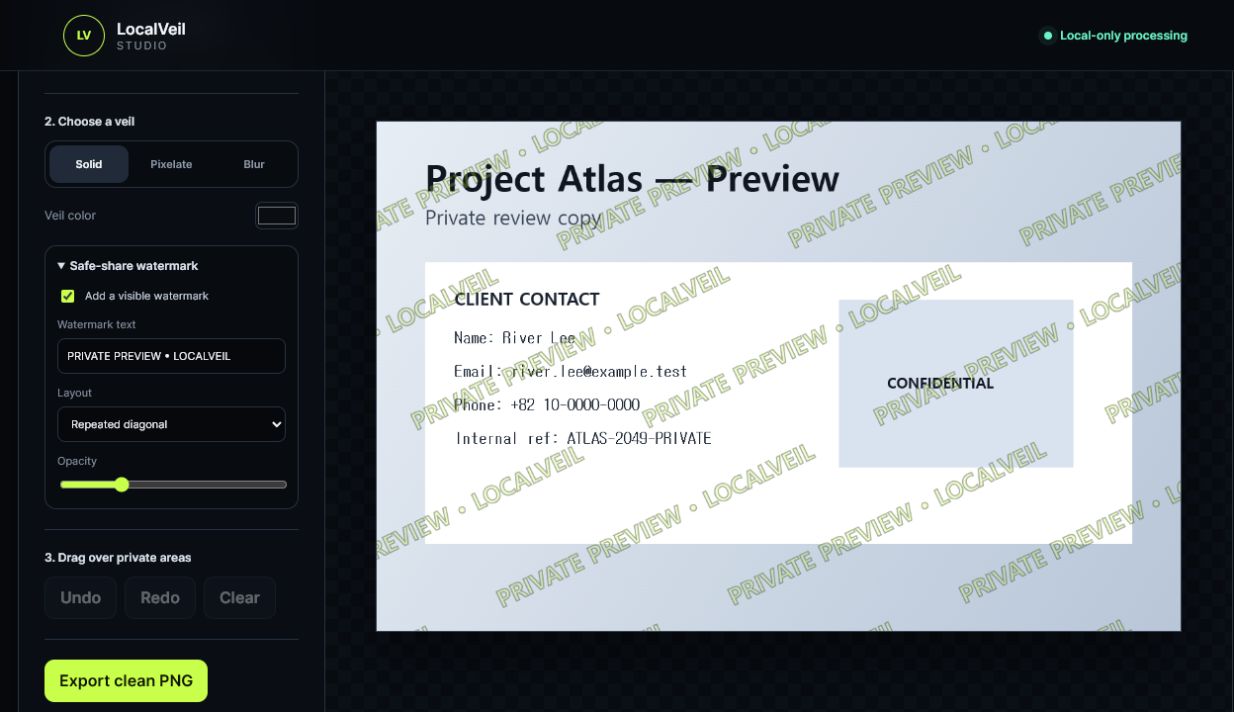
Image Veil supports solid, pixelated, and blurred masks. The solid mask is the recommended option for high-risk concealment because blur and pixelation are visual treatments rather than strong redaction. Users can draw over private contact information, credentials, filenames, browser tabs, customer details, faces, notes, or other regions, then undo, redo, clear, add a repeated or footer review watermark, and export a fresh PNG or compact JPG at the original pixel dimensions.
Text Veil helps create a safer copy of pasted text. It can detect and mask common patterns including email addresses, phone numbers, URLs, card-like numbers, IP addresses, Korean resident ID formats, and token-like secrets. Buyers can also add their own list of names, client codenames, addresses, or project terms. Automatic detection is a review aid, not a guarantee, so every result should be checked before it is shared.
Clean Export provides a focused metadata-cleaning workflow. Users can add several images and export newly rendered copies. Because the exports are rebuilt from pixels rather than copied from the source container, the original embedded image metadata is not carried into the new file. The product does not edit PDFs, videos, office documents, or cloud files directly in version 1.0.0.
A public demo is available with safe sample content. Visitors can test masking, text redaction, and export behavior without uploading a personal screenshot or entering an email address. This makes it possible to verify the core workflow before purchasing. The site also publishes clear security notes, license terms, a refund policy, a safe-share checklist, and an agency evaluation guide.
LocalVeil Studio uses one-time licensing rather than a subscription. The Individual license is USD 59 for one purchaser. The Team license is USD 249 for up to ten named users in one organization. The Agency license is USD 499 for up to twenty-five named users and allows the unmodified package to be placed on an access-controlled internal file share. Every tier includes the same three tools and supporting guides; the price changes the permitted internal user count.
The strongest fit is for freelancers, support teams, agencies, researchers, designers, developers, and operations staff who regularly prepare screenshots for tickets, documentation, client reviews, internal handoffs, or public tutorials. Its main advantage is not artificial intelligence or automatic judgment. It is a transparent, inspectable, local workflow that reduces the need to expose source material to a hosted service.
LocalVeil Studio is a practical privacy aid, not a guarantee against every disclosure. Users remain responsible for covering the complete sensitive region, choosing solid masks for high-risk information, and inspecting the exported file before sharing. Support requests should include only an order number, browser and operating-system version, and non-sensitive error text. Customers are specifically told not to send the private screenshot or text they intended to redact.
Key features
- Zero-upload local screenshot processing
- Solid, pixelated, and blurred masking
- Pattern-based sensitive-text redaction
- Metadata-clean PNG and JPG export
- Offline-ready ZIP with no account or subscription
Pros
- Processes files locally with zero uploads
- No account, installer, API key, analytics, or subscription
- Public demo with safe sample content
- One-time licenses for individuals, teams, and agencies
Cons
- Does not edit PDFs, videos, office documents, or cloud files directly
- Automatic detection still requires final human review
- Blur and pixelation are not strong redaction
Gallery
Reviews
Reviews are moderated before appearing publicly.
No reviews yet — be the first to share your experience.