 ProductReveal
About this product
# A calmer home for multi-agent coding sessions
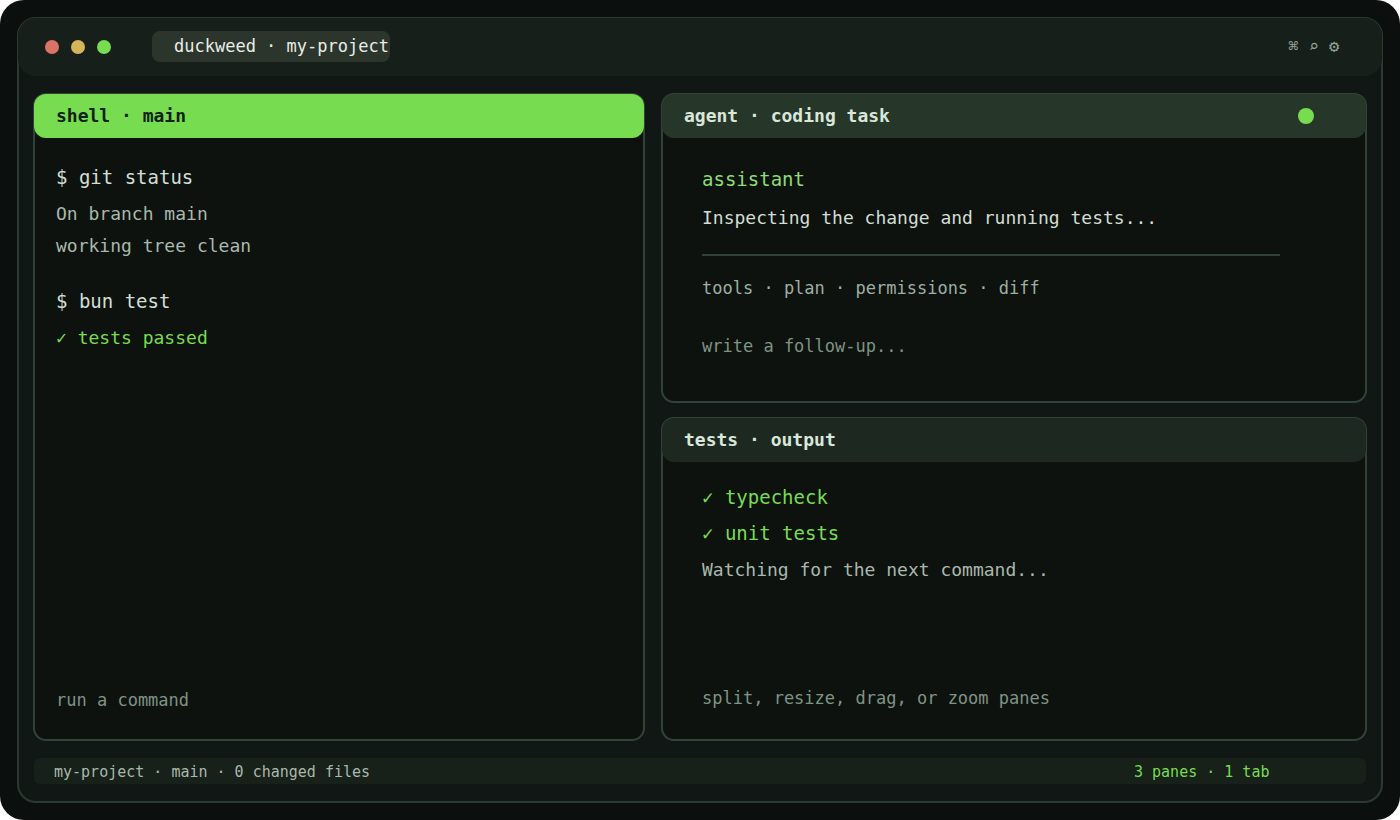
Duckweed is a cross-platform desktop terminal workspace for developers who have started running more than one coding agent at a time. It is built around a simple problem: a real coding session often needs a shell, an agent, a test process, logs, and Git review visible together, but a collection of unrelated terminal windows becomes difficult to manage.
The app opens a project folder and gives it a workspace of tabs and tiling panes. Each pane can own a real shell session, so Duckweed remains useful even when you are not using an AI agent. A typical setup might keep a normal shell on one side, Claude Code or Codex in another pane, and a test or development server in a third. Panes can be split, resized, swapped, dragged, zoomed, and revisited without turning the underlying process into a simulated transcript.
## Built around the tools you already use
Duckweed does not provide a hosted model, replace your provider account, or upload your repository to a new cloud service. It launches the coding-agent CLIs already installed on the computer. The current custom interfaces cover Claude Code, Codex CLI, Cursor Agent, Grok CLI, and OpenCode. The interface can show streamed responses, tool calls, plans, permission requests, file changes, diffs, session history, and token usage when the local provider protocol exposes those details. If you prefer the original terminal UI, custom agent mode can be turned off and the pane behaves like a regular shell.
That local-first boundary is one of Duckweed's strongest qualities. Projects, layouts, settings, agent sessions, and usage indexes stay on the machine. The usage view reads the local session files that supported tools already keep; it does not upload transcripts for a dashboard. Provider CLIs still contact their own services, of course, and users remain responsible for their own provider sign-in and credentials.
## Practical workspace features
The project context bar keeps the current folder, Git branch, changed-file count, line totals, shell, tab, and pane count nearby. A built-in diff view makes it possible to review uncommitted changes without leaving the workspace. The command palette covers projects, shells, tabs, panes, settings, and updates. Search can inspect terminal scrollback, and optional highlighting makes paths, URLs, flags, hashes, diffs, warnings, and errors easier to scan. A tools panel adds a file browser, saved layouts, a checklist, session statistics, listening-port actions, and power controls for long-running work.
Duckweed supports Windows x64, macOS universal builds, and Linux x64 AppImage and Debian packages. The Windows installer is per-user, while macOS and Linux have the normal platform-specific first-launch considerations. The project documents the current limitations plainly: the Windows installer is not commercially code-signed yet, macOS may require an explicit first-launch approval, and Duckweed does not install or authenticate any coding agent for you.
## Who it is for
Duckweed is a good fit for someone who wants a visual, persistent workspace around local shells and several coding agents, especially when switching between separate application windows has become the main source of friction. It is less compelling if you only need one fast terminal, already have a well-tuned tmux workflow, or want a hosted collaborative coding environment. It is also worth noting that the project uses a source-available license rather than an OSI-approved open-source license; the license and distribution conditions are included in the repository.
The project is still young, so users should read the quick-start and troubleshooting notes before installing and report reproducible issues with their platform and shell details. For developers who want to keep real terminals, agent conversations, tests, and Git review in one local window, Duckweed is an interesting, focused option rather than another cloud wrapper around an AI model.
Key features
- Real PTY-backed shells across Windows, macOS, and Linux
- Tiling panes, tabs, project context, and in-workspace Git diff review
- Native interfaces for Claude Code, Codex, Cursor Agent, Grok CLI, and OpenCode
- Local-first layouts, sessions, usage indexes, and settings
- Per-user installers with documented update and first-launch behavior
Pros
- Local-first; real shells; clear platform documentation
Cons
- Young project; installer signing and platform polish are still evolving
Reviews
Reviews are moderated before appearing publicly.
No reviews yet — be the first to share your experience.