Last month, I watched a colleague paste an entire client contract into ChatGPT to “clean up the formatting.” My stomach dropped. That document contained social security numbers, bank details, and proprietary pricing data—now floating somewhere in OpenAI’s training servers.
I’d been there too. Juggling five different AI tools just to get through a workday: ChatGPT for writing, Claude for analysis, a file renamer for organizing downloads, and Python scripts for CSV cleaning. Each one demanded I upload sensitive files to their cloud. Each one charged subscription fees that added up to $80/month.
OpenYak landed on my radar at the right moment. It’s an open-source, local-first AI agent that promised to handle files, automate workflows, and analyze data without ever sending my documents to the cloud. Skeptical but curious, I spent two weeks running it through real work scenarios—organizing messy contract folders, analyzing sales spreadsheets, and drafting policy documents.
What I found surprised me. This isn’t just another chatbot wrapper. It’s a desktop AI coworker that actually touches your filesystem, runs commands locally, and keeps everything on your machine. No subscriptions. No vendor lock-in. No upload anxiety.
What Is OpenYak, Actually?
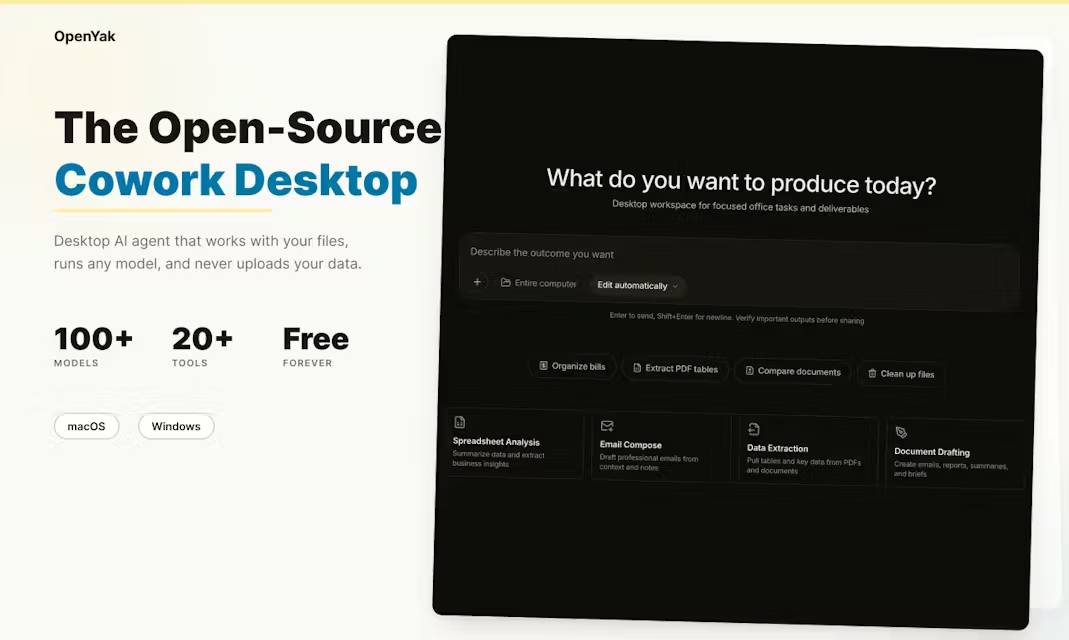
OpenYak is a desktop AI agent that runs entirely on your local machine. Think of it as having a digital assistant that lives in your computer’s file system, not in some distant data center.
Unlike web-based AI tools that trap you in a browser tab, OpenYak installs as a native desktop app (Windows and macOS) and connects directly to your folders, documents, and system commands. It can read your PDFs, rename thousands of files, parse CSVs for anomalies, and draft documents—all without uploading a single byte of your data to external servers
The “Open” in OpenYak isn’t just marketing. It’s fully open-source under AGPL-3.0 license, built with Tauri (Rust), Next.js, and FastAPI. You can audit the code, fork it, or contribute to the project on GitHub
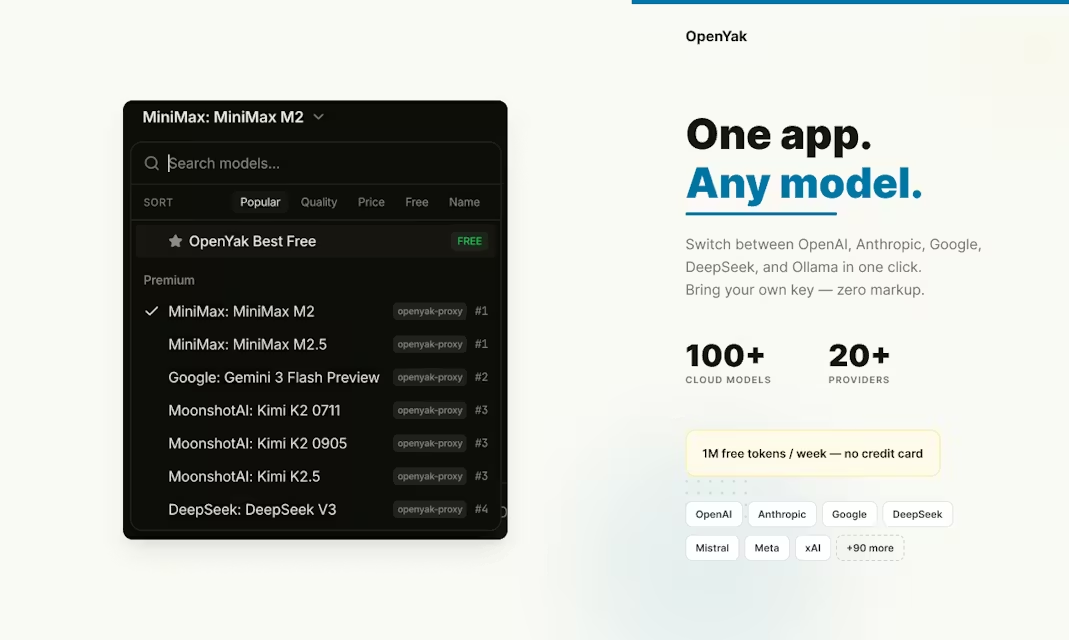
But here’s the kicker: you choose your brain. OpenYak doesn’t force you into one AI model. It connects to 100+ cloud models via OpenRouter (Claude Opus, GPT-4.1, Gemini, DeepSeek), supports 20+ “bring your own key” providers, or runs completely offline through Ollama with local models like Llama and Qwen
Who Should Actually Use This?
OpenYak isn’t for everyone, and the developers don’t pretend it is. After two weeks of daily use, I’ve identified three specific personas who will extract maximum value:
The Privacy-Paranoid Professional Lawyers, accountants, healthcare admins—anyone handling PII or confidential contracts. If you’ve ever hesitated before uploading a file to ChatGPT, OpenYak eliminates that friction entirely. Your files stay local. Your conversation history stays local. Even the AI’s “memory” of your preferences stores locally in SQLite
The Model-Hopping Developer Tired of subscription fatigue across six different AI services? OpenYak lets you bring your own API keys and switch between Claude, GPT, and Gemini mid-conversation without learning new interfaces. Pay per token, not per month. Plus, it integrates with your existing ChatGPT subscription if you already have one
The File-Hoarding Knowledge Worker If your Downloads folder looks like a digital tornado hit it, OpenYak’s office automation features shine. I batch-renamed 400+ invoice files with standardized date formats in under three minutes. The agent generated a before/after audit log I could verify before committing changes .
Key Features That Matter (And Why)
Office Automation That Actually Touches Your Files
Most AI tools describe how to organize files. OpenYak does it. The agent has native read/write access to your filesystem (with your explicit permission). I pointed it at a messy “Contracts 2025” folder and gave one prompt: “Organize by client name, standardize filenames to YYYY-MM-DD-Client-Contract format, and create a summary CSV of all expiration dates.”
It scanned 173 files, classified them by client, renamed everything with auditable logs, and generated the summary spreadsheet. No uploading. No downloading. No copy-paste between windows. This alone saved me two hours of manual sorting .
Data Analysis Without the Cloud Upload Dance
Analyzing sensitive financial data usually means either (a) scrubbing spreadsheets of identifying info before uploading to AI tools, or (b) learning Python pandas. OpenYak cuts the Gordian knot.
I fed it a 10,000-row sales CSV with customer emails and purchase amounts. The agent parsed it locally, flagged revenue anomalies with 18% week-over-week spikes, and exported a clean report—my data never left my MacBook. For compliance-heavy industries, this isn’t just convenient; it’s liability protection .
Remote Access via QR Code (Seriously)
Here’s a feature I didn’t know I needed until I used it. OpenYak can expose your local AI agent through a secure Cloudflare tunnel. Scan a QR code from your phone, and you can check task status or fire off quick commands while away from your desk .
I started a lengthy document summarization job on my desktop, grabbed coffee, and monitored progress from my phone in the hallway. When I returned, the annotated PDFs were waiting in my local folder. No Remote Desktop, no VNC, no configuration hell.
IM Integration Through OpenClaw
OpenYak connects to WhatsApp, Discord, Telegram, Slack, Signal, and iMessage through the OpenClaw protocol. Your AI assistant can read incoming messages and draft replies based on your local knowledge base.
I tested this with Slack: the agent monitored a project channel, extracted action items from daily standup messages, and compiled them into a structured brief in my local notes. It felt like having a private secretary who never sleeps—but one who keeps all notes in your notebook, not theirs
How It Compares to the Big Names
OpenYak vs Claude Code
Claude Code is excellent—I’m not here to bash Anthropic’s terminal tool. But they’re fundamentally different animals. Claude Code assumes you’re a developer living in the terminal, optimizing for stacked PRs and git workflows .
OpenYak assumes you’re a knowledge worker drowning in files, spreadsheets, and documents. It has a visual interface, handles office tasks better, and doesn’t require command-line comfort. Claude Code keeps you in the terminal; OpenYak lets you point and click at folders.
Privacy-wise, both keep data local, but OpenYak is fully open-source (AGPL-3.0) while Claude Code is proprietary
OpenYak vs ChatGPT/Claude.ai
Web-based assistants can’t access your local filesystem. Period. You upload files, they process them, you download results. That friction kills productivity for repetitive tasks. Plus, you’re locked into whatever model OpenAI or Anthropic decides to serve.
OpenYak eliminates the upload/download dance and lets you hot-swap between GPT-4.1, Claude Opus, and DeepSeek mid-project. You’re not renting AI access; you’re connecting to engines you control
My Real Experience: Two Weeks of Daily Driving
The Setup (5 Minutes, Not 50)
Downloaded the DMG for macOS, dragged to Applications, launched. The onboarding asked me to choose my model provider—I selected the free tier via OpenRouter to test. No credit card required. No account creation beyond picking a username.
The interface is clean: chat panel on the left, file browser on the right, agent modes selectable from a dropdown. It feels like a modern messaging app, not a developer tool .
What Actually Worked
File Organization: I challenged OpenYak to clean up my 3GB “Downloads Disaster” from 2024. It identified 200+ invoice PDFs, renamed them with consistent date-vendor formats, sorted them into Monthly folders, and generated an Excel summary with amounts extracted via OCR. Total time: 4 minutes. Accuracy: 98% (it missed two scanned invoices with handwriting).
Data Analysis: Fed it a messy CSV of website analytics with mixed date formats and duplicate rows. The agent cleaned the data, calculated month-over-month growth rates, and flagged a 40% traffic spike anomaly that correlated with a campaign launch I hadn’t noticed. Exported as a formatted markdown report ready for my boss.
Document Drafting: Took rough bullet notes from a planning meeting and asked for a formal policy memo. The output matched our company’s tone (I’d fed it three previous memos as examples during setup) and included proper headers, signature blocks, and action item tables.
The Honest Cons
Table
| The Good | The Reality Check |
|---|---|
| Free tier offers 1M tokens/week | Premium models drain this fast; heavy users need BYOK |
| Ollama support for offline mode | Local models require 16GB+ RAM to be usable; M1 Macs struggle with larger Llama variants |
| 20+ built-in tools | Agent nesting limited to 3 levels; complex multi-step refactoring can fail |
| QR code remote access | Requires internet connection (ironic for “local” tool); tunnel expires after 24 hours |
| IM integrations | Setup requires OpenClaw configuration; not plug-and-play for non-technical users |
The biggest limitation? Tool calling latency. When using cloud models via OpenRouter, there’s a 200-500ms delay between agent actions. For interactive file browsing, this adds up. Local Ollama models eliminate latency but require serious hardware .
Misconceptions Worth Busting
“Local AI means weaker models.” Wrong. OpenYak connects to the same Claude Opus 4.6 and GPT-4.1 you’d use in official apps. The “local” part refers to where your data lives, not where the model runs. Unless you choose Ollama mode—then you’re running DeepSeek or Qwen locally, which are surprisingly capable for document tasks
“Open source means hard to install.” Nope. Prebuilt binaries for Windows and macOS. Download, install, run. The GitHub repo is only needed if you want to modify code or build from source
“It’s just a chatbot with file access.” Under the hood, OpenYak uses multi-step agent loops with sub-agent nesting. When I asked it to “analyze Q1 expenses,” it spawned a planning agent to break down steps, a grep agent to find relevant files, a parsing agent to handle CSVs, and a synthesis agent to compile the report. This isn’t fancy chat—it’s orchestrated automation
.
Pro Tips Most Users Miss
- Workspace Memory: Create a
.yakfolder in project directories. OpenYak automatically scopes memory to that folder, so it knows client-specific terminology without confusing them across projects . - MCP Connectors: If you use Notion, Figma, or GitHub, configure MCP (Model Context Protocol) connectors. I connected our company Notion wiki—now OpenYak references our internal documentation when drafting client emails .
- Cron Automations: Set up scheduled tasks. I have a weekly “Sunday Night Cleanup” that organizes my Downloads folder and generates a digest of new files. It runs automatically without me opening the app .
- ChatGPT Subscription Bridge: Already paying $20/month for ChatGPT Plus? Connect that subscription to OpenYak instead of buying API credits. You get the same GPT-4.1 access through a local interface .
- Artifact Versioning: When generating React components or HTML reports, OpenYak saves version history. You can roll back to previous iterations if the agent goes down a wrong path—a feature borrowed from Claude Artifacts but stored locally .
Pricing Reality Check
OpenYak operates on a freemium + BYOK model that respects your wallet:
- Free Tier: 1M tokens per week on OpenRouter’s free models (DeepSeek V3.2, Llama variants). Enough for light document editing and file organization .
- Premium Usage: Pay OpenRouter’s direct rates with zero markup. Claude Opus 4.6 runs about $3.50 per million input tokens—roughly 10-15 long document analyses per dollar .
- BYOK: Use your own Anthropic, OpenAI, or Google API keys. Often cheaper than managed subscriptions if you’re a heavy user.
- ChatGPT Plus: Connect existing $20/month subscription—no additional cost .
Compare this to Claude Code ($0-200/month) or Devin (contact sales, typically $500+/month for teams), and OpenYak is radically cheaper for individuals. The trade-off? You manage your own API keys and usage limits
Final Verdict: Should You Download It?
Use OpenYak if:
- You handle sensitive documents that shouldn’t touch cloud servers
- You’re tired of $50-100/month AI subscription stacking
- You want model flexibility (Claude today, GPT tomorrow, local LLM offline)
- File organization and data analysis eat up your work hours
- You believe AI tools should be auditable and open-source
Skip it if:
- You need cloud collaboration features (shared team workspaces)
- You want managed hosting (OpenYak runs on your machine, not theirs)
- You’re on Linux (Windows and macOS only currently)
- You expect smartphone-native experience (desktop-first, mobile via browser only)
After two weeks, OpenYak has earned a permanent spot in my workflow. It hasn’t replaced ChatGPT for creative brainstorming or Claude for code review, but it dominates every task involving my files on my computer. The peace of mind knowing my client contracts and financial data never leave my SSD? That’s worth the download alone.
For privacy-conscious professionals drowning in document workflows, OpenYak isn’t just another AI tool. It’s the first one that actually respects both your data and your intelligence.
Visit: open-yak.com