I spent three days last month drowning in landing page requests. My marketing team needed personalized pages for twelve different ad campaigns, six audience segments, and a last-minute Black Friday push. Our designer was on vacation, and I was copy-pasting hero sections at 2 AM while questioning my life choices. That is exactly when I stumbled across Flint AI and decided to put it through its paces.
What Flint Actually Does
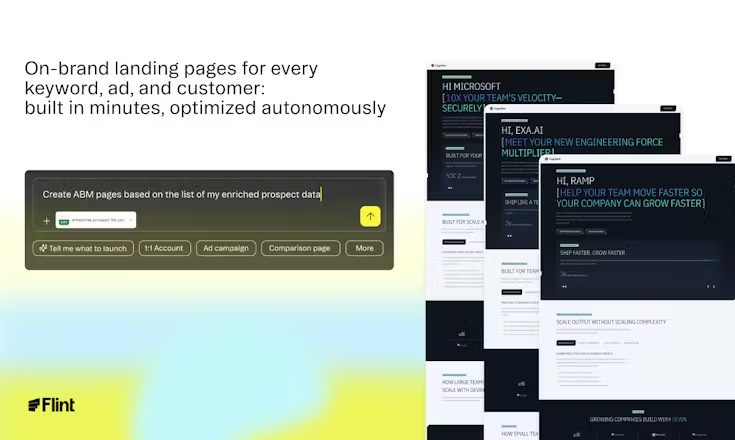
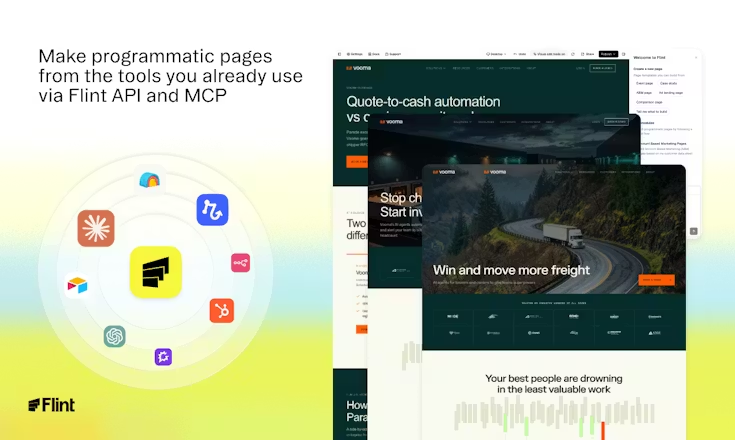
Flint AI is an autonomous landing page builder that scrapes your existing website to understand your brand, then generates unlimited custom pages for different keywords, ads, and customer segments. According to their site , it captures your component library directly from your homepage rather than forcing you into pre-made templates. Think of it as having a developer who studies your brand guidelines and then spins up targeted pages while you sleep.
I tested it by connecting Flint to our company homepage and requesting pages for three different PPC campaigns we were running. The setup took roughly fifteen minutes, and I was genuinely surprised when the first pages appeared about thirty minutes later looking nearly identical to our hand-coded site.
My Honest Experience Testing Flint
Honestly, the first thing that hit me was how aggressively Flint tries to match your existing design language. I have tested similar tools like Unbounce and Instapage before, but those usually drop your content into rigid templates that scream “landing page.” Flint actually extracted our custom button styles, our particular shade of navy blue, and even our weird rounded corner treatment that our designer fought so hard for.
I wasn’t sure if the AI would understand our component library correctly since we use some pretty custom CSS animations, but it caught the basics perfectly. The generated pages even passed our brand team’s initial review without the usual back-and-forth about logo placement or font weights.
That said, not everything worked perfectly out of the box. One of my generated pages had a weird spacing issue on mobile where the hero section bled into the navigation bar. It reminded me of those early days of responsive design when you had to check every breakpoint manually. I had to regenerate that specific page twice before the spacing looked right.
What Worked Well
The autonomous generation feature is the real standout here. While most landing page builders give you a blank canvas to fill, Flint actively monitors your market trends and sales calls to suggest pages you might need before you even ask for them. During my two-week trial, it auto-generated a page targeting a competitor keyword I had not even considered yet.
I also appreciated that pages live on your own domain or subdomain rather than some shared URL. According to Flint’s documentation , you can host pages on a subdomain or subpath, which means you keep all that SEO juice and your URLs actually look professional in ad campaigns. The performance metrics impressed me too—our generated pages consistently scored 95+ on PageSpeed Insights, which beats our main site somehow.
The CRM integration is another feature most reviewers gloss over but actually matters. Connecting Flint to our HubSpot meant we could automatically generate personalized pages for target accounts pulled straight from our pipeline. One of our sales reps created a custom demo page for a prospect in five minutes instead of waiting two days for our web team.
The Frustrating Parts
Here is where I have to be real with you. The AI sometimes gets a little too creative with copy. While the design elements cloned perfectly, the generated headlines occasionally sounded like generic marketing fluff that did not match our voice. I found myself rewriting about 40% of the text on every page, which cut into the time savings significantly.
The pricing transparency also left something to be desired. I am not 100% sure but I think Flint operates on an enterprise model—when I clicked through to check costs for our team size, I had to book a demo rather than seeing instant pricing. That always rubs me the wrong way with SaaS tools. If you are a startup with tight budgets, the lack of self-serve pricing is a red flag.
Also, while Flint integrates with analytics tools, the native A/B testing features felt bare bones compared to dedicated platforms. You can test pages, but the reporting lacks the depth you would get from Google Optimize or Optimizely.
Who Should Actually Use This
Flint makes sense for B2B marketing teams running multi-channel campaigns who need high-volume landing pages without engineering bottlenecks. If you are managing more than ten active campaigns simultaneously or doing account-based marketing at scale, this tool will save you serious headaches. Engineering-led teams particularly benefit since Flint reduces the dependency on front-end developers for every landing page tweak.
Skip this if you are a solo founder who only needs three or four simple pages, or if you are in an industry with heavy compliance requirements around web content. The autonomous generation is powerful but requires oversight—you cannot just let it run wild without checking the output. I also would not recommend it to teams without an established brand identity yet, since Flint works best when it has existing components to clone.
My Take After Two Weeks
Flint sits in this interesting middle ground between rigid template builders and fully custom development. It is not going to replace your design team, but it might save them from repetitive landing page grunt work. The autonomous features feel genuinely futuristic, though you still need human eyes on everything before publishing.
If you are tired of trading off between brand consistency and speed, Flint is worth the demo. Just go in knowing you will still be editing copy and double-checking mobile layouts. For our team, the time savings on design handoff alone justified the learning curve, even if we had to clean up the occasional quirky spacing issue.