Introduction
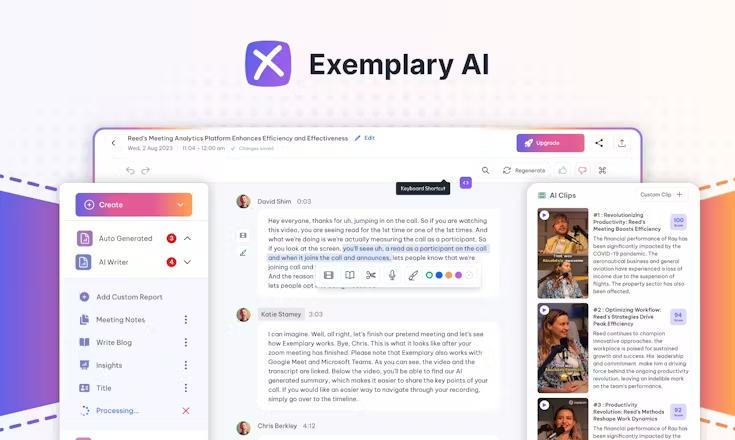
Exemplary AI is a content-repurposing platform built to help creators, marketers, podcasters and businesses move from raw audio/video into a full range of usable formats (transcripts, summaries, clips, blog posts, social-media assets) with minimal manual effort.
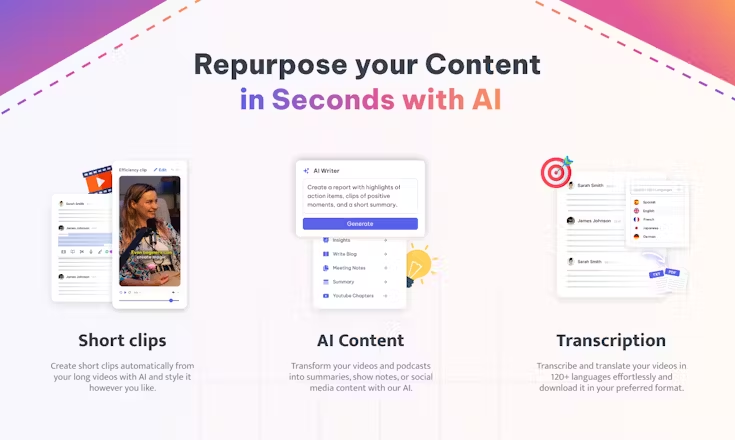
It works by uploading your media (a webinar, podcast, interview, long-form video) and using AI engines to transcribe, translate, cut into short clips, generate audiograms, create blog drafts, show-notes, translate into many languages and pull key insights from the conversation.
Rather than treating your video or audio as a single asset, Exemplary AI treats it as a content gold-mine: every minute can become multiple outputs (short social clips, subtitles, blog posts, multilingual versions). The platform supports uploads from your files or via URLs, uses built-in editors and AI tools to turn your content into formats tailored for different channels (YouTube, TikTok, LinkedIn, blog).
Users report that the platform is especially useful in situations where you already have long-form content and want to “get more mileage” from it—by creating micro-content, engaging snippets, blogs, and accessible transcripts without duplicating workflow.
Exemplary AI also includes features like AI chat (you can query your transcript to ask “what were the main takeaways?”), translation in 90+ languages, subtitles, speaker labelling, analytics, and social-media‐ready export formats. In short: if you’re doing audio or video and want to repurpose it richly, this platform offers a streamlined, automated workflow rather than manual slicing, transcribing, editing and republishing.
🌟 Why You Should Choose
Turn Long-Form Audio/Video into Many Assets — Upload a full episode or talk, and create clips, summary blogs, transcripts, audiograms and social posts in one workflow.
Multilingual & Global Reach — Translate your content into 90+ languages and generate subtitles, increasing accessibility and reach across regions.
AI Chat / Query from Media — Ask questions of your transcript (“what did speaker X say about topic Y?”) and generate written content based on those insights.
Short-Clip / Social Asset Creation — Quickly extract high-impact moments to produce vertical or square videos for platforms like Instagram Reels, TikTok or YouTube Shorts without heavy editing.
Efficient Workflow for Creators & Teams — Reduces manual tasks (transcription, slicing, summarising) so creators, marketing teams or agencies can scale content repurposing rather than starting from scratch each time.
⚙️ Additional Highlights
Supports uploads from audio or video files; includes free-tier credits to try basic features.
Rich export formats: full transcript (editable), subtitles (SRT/VTT), short-form video exports, blog-post drafts, social post text/caption suggestions.
Team/agency features: multiple users/seats, shared workspace, version control of media and assets.
Reviews highlight ease of use, accuracy of transcription in many languages, and useful time savings for repurposing content.
Typical use-cases include: podcasters turning episodes into blogs, coaches turning webinars into social clips, companies turning meetings into knowledge assets, and marketers scaling content from one core piece.
Launch Date & Founder Name
The product is publicly referenced in reviews and listings around 2024-2025.
The LinkedIn profile lists the company founded under the name Exemplary Inc. and identifies itself as the maker of the platform.
While full founder names are not widely publicised, one source mentions a founder as Johann Verghese.
Pros And Cons
Pros:
- Powerful repurposing toolkit that saves time and boosts content output from a single original asset.
- Strong multilingual/transcription support which expands accessibility and reach.
- Good value for creators and teams who already produce long-form media and want to maximise ROI.
- Simplifies the workflow from “raw content” to “many outputs” in one platform rather than hopping between tools.
- Positive user reviews highlight ease of use and broad functionality for creating social video clips, transcripts and blog drafts.
Cons:
- While transcription and AI generation are strong, outputs may still require human polish to ensure brand voice, technical accuracy or fine editing.
- Upload minute limits or credit-based plans may restrict heavy users unless upgraded.
- Some features (very advanced editing, highly custom video production) may be less mature compared to dedicated video-editing platforms.
- For teams with very large volumes of live-editing, complex workflows, or enterprise-grade collaboration features, it may lack some specialist features compared to heavier video software.
- As a newer tool, the UI, integrations or edge-case support (very long videos, many speakers, very high resolution) may still evolve.