
Introduction
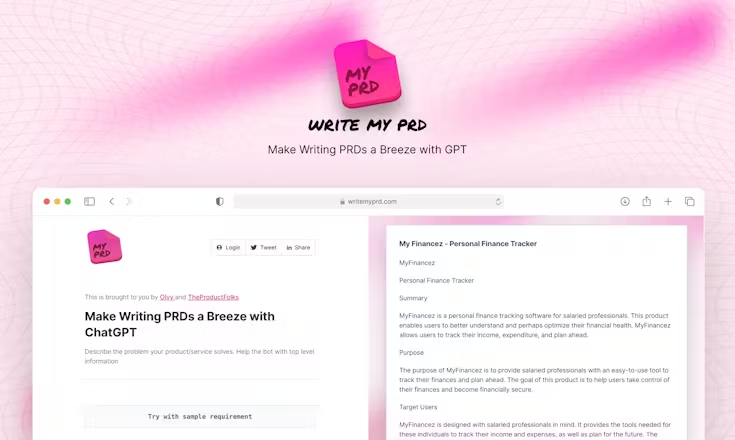
WriteMyPRD is an AI-powered platform designed to streamline the creation of Product Requirements Documents (PRDs) for product teams, startups, and project managers. Instead of starting a PRD from scratch—crafting objectives, user stories, feature lists, success metrics, and technical requirements one by one—WriteMyPRD allows you to input key details about your product or feature and receive a structured PRD draft produced in minutes. Built on top of GPT-3 (or similar large-language-model technology), it aims not only to speed up the process of documentation but also to ensure that PRDs follow an industry-standard structure and are ready for further refinement and collaboration.
The platform is particularly beneficial when time is tight, new features are being scoped rapidly, or smaller teams lack formal product-management resources. Users describe it as a way to overcome “writer’s block” in product documentation, focus more on strategy and less on paperwork, and get a solid foundation for product planning. While the output still requires review—especially for domain-specific accuracy, edge cases, data privacy or technical constraints—WriteMyPRD handles the heavy lift of structuring content, enabling product teams to iterate faster.
WriteMyPRD also provides additional resources such as templates, a guided workflow (e.g., “describe the product → define users → list features → set metrics”), and export options that allow the PRD to be integrated into your team’s documentation tools. The emphasis is on accessibility: whether you’re a solo product manager, a startup founder or part of a growing product team, the tool is built with minimal setup and aims to fit into your current workflow rather than requiring adoption of a complex new system.
In summary, WriteMyPRD offers a pragmatic solution for product teams seeking to elevate their documentation practice without increasing overhead—giving you a ready-to-edit PRD draft, so you can spend your time refining strategy, validating assumptions and collaborating, rather than structuring blank pages.
🌟 Why You Should Choose
Rapid PRD generation – Get a complete draft of a product requirements document based on your inputs in minutes, rather than spending hours building it from scratch.
Structured, industry-standard format – The output follows professional PRD best practices (objectives, user personas, features, success metrics, constraints, etc.), which reduces formatting and structural work.
Lower barrier for teams without documentation specialists – Ideal for small companies or teams without a dedicated product-writer; you feed key details and the tool does the heavy-lifting of structuring and drafting.
Focus on refinement and strategy, not setup – Instead of spending time laying out headings or figuring out what components a PRD needs, you can jump straight into iterating content, validating assumptions and collaborating.
Export and integrate into workflows – Once generated, you can edit and refine the PRD and export it into your documentation stack, allowing seamless hand-off to engineering, design or stakeholders.
⚙️ Additional Highlights
Offers a guided input workflow: you answer a few prompts (e.g., product vision, target users, feature list) and the AI builds your document.
Contains resource materials and templates to assist users in understanding how PRDs are structured and what to include.
Designed with simplicity in mind—minimal onboarding, and you don’t need deep AI or product-management knowledge to get started.
Particularly suited for startups or rapid-iteration environments where documentation speed matters.
A free tier or trial is available, allowing you to test basic features before upgrading.
Launch Date & Founder Name
Launch timing: Public references indicate it was launched around 2023.
Founder/team: The tool is listed as built by designer/developer Arnob Mukherjee (and associated team) via the product-community release.
Pros And Cons
Pros:
- Significantly cuts down time required to produce a structured PRD.
- Helps teams maintain documentation discipline even without dedicated writers.
- Provides a consistent structure, reducing missing sections or components.
- Good fit for agile teams, startups, solo product managers or smaller organisations.
- Low setup/friction means you can try it quickly and decide if it fits your workflow.
Cons:
- The quality of the output still depends heavily on the quality of input you provide (clear product vision, accurate feature list, user personas).
- Customisation might be less flexible than fully manual PRD creation; you might want more control over style or format.
- For extremely large, complex product systems, the generated draft may need significant refinement to cover detailed architecture, integrations and non-functional requirements.
- There may be limitations in integrations, versioning, collaboration workflows compared to full-scale product-documentation platforms.
- As with any AI document generation tool, you’ll still need to validate metrics, technical assumptions and edge-cases—automation doesn’t replace domain review.